Safe AI Agents in Business: Granting System Access Without Creating Operational Risk
A practical guide to granting AI agents controlled access to CRM, email, invoices, documents, and workflows through least privilege, approval gates, logging, testing, and monitoring.
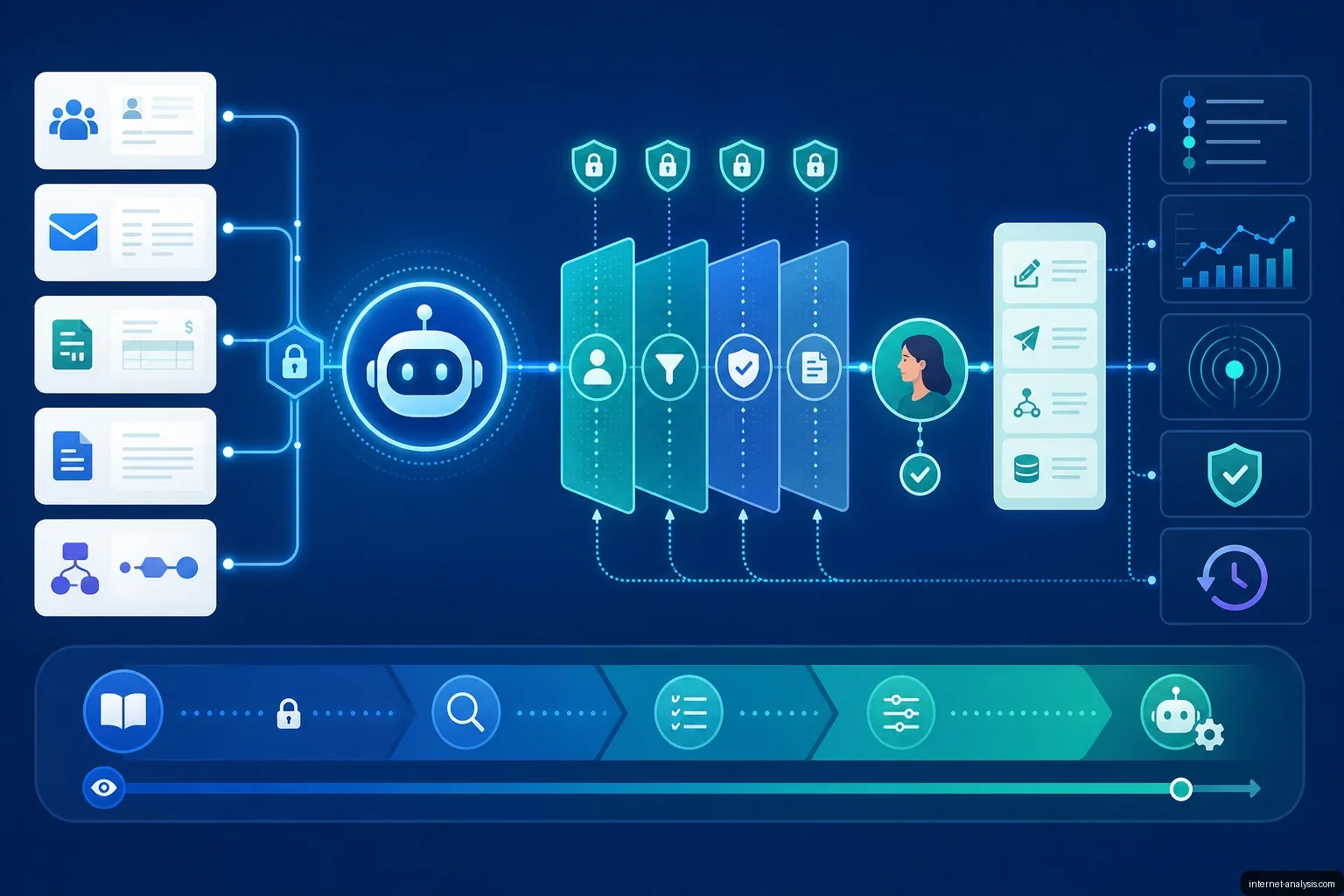
AI agents can reduce administrative work, accelerate customer service, organize documents, and automate tasks across CRM, invoicing, email, and workflow systems. Unlike a conventional chatbot, however, an agent may also retrieve records, update data, send messages, or advance a business process.
That ability creates value and risk at the same time. The central question is not simply whether a company should automate work, but how much authority an agent needs, which actions require approval, and how the organization will detect and investigate failures.
A safe implementation begins with the business process and its access controls—not with the choice of AI model.
What Is an AI Agent?
A chatbot generally generates an answer for a user. An AI agent can analyze context, make decisions within defined rules, and take actions through connected tools such as email platforms, CRM and ERP systems, spreadsheets, document repositories, invoicing applications, and task managers.
For example, a chatbot might identify that a customer is asking about an order. An agent could locate the customer in the CRM, check the order status, draft a response, add a case note, and move the ticket to another stage. Each additional action increases the importance of permissions, validation, and traceability.
The strongest business cases are often routine operational bottlenecks rather than highly autonomous systems. Examples include duplicate data entry, delayed replies, inconsistent records, repetitive reporting, disorganized documents, and information that must be transferred manually between applications.
Why Businesses Are Adopting Agents
Operational workloads can grow faster than teams. Sales representatives may spend hours maintaining CRM records, invoices may wait too long for review, and leads collected through forms may not receive timely follow-up. Agents can take over part of this repetitive work without requiring every process to become fully autonomous.
McKinsey’s The State of AI: Global Survey 2025 found that organizations reporting stronger AI outcomes were more likely to have defined processes for human validation. Deloitte has likewise observed that agentic AI adoption is advancing faster than many corporate control mechanisms.
These findings point to a practical requirement: businesses need an operating model that defines who authorizes an agent, what it can do independently, when it must stop, and how its activity can be reconstructed later.
When System Access Is Justified
An agent needs system access when it must do more than generate text. Access may be appropriate for the following uses:
- CRM: completing lead records, summarizing conversations, detecting incomplete fields, and assigning follow-up tasks.
- Email: classifying inquiries, identifying urgent messages, preparing drafts, and routing requests.
- Invoices: extracting fields, matching invoices with purchase orders, and flagging discrepancies.
- Documents: locating contract clauses, producing summaries, classifying files, and identifying missing attachments.
- Workflows: moving tasks between stages, sending reminders, and closing simple, low-risk tickets.
Access does not have to mean autonomy. In many cases, the safest and most useful design is suggest, but do not execute. The agent gathers information and proposes an action, while a person remains responsible for approving it.
Human approval is particularly important when an action affects payments, personal data, legal documents, sales terms, complaints, disputes, or other sensitive customer communications.
How to Design a Secure Implementation
1. Map the real process
Document where information originates, who enters or re-enters it, where work waits for approval, and which exceptions require judgment. Identify both repetitive tasks and consequential decisions. Automating an unclear process can make existing disorder move faster.
2. Define the operating rules
Separate permissions into four questions: What may the agent read? What may it recommend? What may it execute? Under which conditions must it stop and escalate?
Rules should account for unusual cases, missing information, contradictory records, high-value transactions, sensitive recipients, and actions that cannot be easily reversed.
3. Integrate systems through controlled interfaces
Agents commonly rely on APIs to exchange data with CRM, ERP, email, document, finance, and workflow applications. Each integration should expose only the functions and records required for the task. Dedicated service identities are preferable to shared employee credentials because they make access easier to restrict, rotate, revoke, and audit.
4. Test before granting production authority
An agent should not enter production with broad write permissions. Early testing can use synthetic or copied data, a limited user group, a sandbox, or read-only access. Teams should deliberately test exceptions before expanding the agent’s scope.
Relevant scenarios include incomplete records, duplicate invoices, conflicting instructions, unavailable APIs, malformed email, unexpected attachments, and attempts to manipulate the agent through untrusted content.
5. Log and monitor every significant action
Logs should show who initiated a process, what information the agent used, what it recommended or executed, whether a person approved the action, and what happened afterward. Monitoring should also detect failed integrations, changing data patterns, unusual activity volumes, and repeated escalations.
Logging makes investigation possible; monitoring helps detect trouble while it is happening. Both are necessary because applications, APIs, data, and user behavior change after deployment.
The Main Risks of AI Agents
Excessive permissions
OWASP uses the term excessive agency for situations in which an AI system has more authority than its purpose requires. An agent assigned to organize tickets, for example, should not automatically receive the ability to delete records, edit unrelated CRM fields, or contact customers.
The danger is not merely that an AI system may produce an incorrect answer. The greater risk is that the incorrect answer may be executed automatically in a connected system.
Prompt injection and untrusted content
An agent that reads email, documents, or web content may encounter text designed to override its instructions. A malicious message could tell the agent to ignore its rules or disclose customer information. Content retrieved for analysis must therefore be treated as data, not as trusted operating instructions.
Defenses include narrow tools, strict authorization checks, isolation of untrusted content, output validation, recipient restrictions, and human approval for consequential actions.
Insufficient human oversight
Classification and drafting are generally lower-risk than sending, approving, paying, or deleting. Problems become more serious when an agent can independently answer complaints, approve payments, modify important statuses, or make irreversible changes.
Human review should focus on exceptions and high-impact decisions rather than every routine step. This preserves efficiency while retaining accountability.
Poor or inconsistent data
An agent cannot reliably compensate for a disorganized CRM or fragmented document set. Outdated, duplicated, or contradictory records can lead to incorrect recommendations and actions. Data quality and process analysis should therefore precede automation.
Weak governance and documentation
Accountability, auditability, privacy, and AI risk management are increasingly important in the United States, the European Union, and other jurisdictions. The NIST AI Risk Management Framework organizes this work around governing, mapping, measuring, and managing AI risk. In practical terms, organizations should be able to explain an agent’s purpose, limits, data use, controls, and escalation path.
A Practical Access Model
The principle of least privilege requires giving an agent only the access necessary for its assigned task. Access can then expand gradually as evidence from testing and production monitoring supports the change.
| Access level | Agent capability | Appropriate uses |
|---|---|---|
| Read-only | Reads information but cannot change it | CRM analysis, reporting, search, and document summaries |
| Suggested action | Prepares a recommendation, draft, or proposed update | Email replies, proposals, and customer-service responses |
| Action after approval | Executes only after an authorized person approves | Invoice exceptions, complaints, payments, and important status changes |
| Limited autonomy | Acts independently within defined thresholds | Ticket tagging, internal reminders, and low-risk task routing |
| Full automation | Completes a process without routine human intervention | Low-risk, stable, thoroughly tested processes with monitoring and rollback controls |
Most organizations should begin with read-only access or suggested actions. Once accuracy, exception handling, and auditability have been demonstrated, selected tasks can move to approval-based execution and then limited autonomy.
Document automation illustrates this staged approach. Rather than giving one agent unrestricted control, the workflow can separate recognition, classification, data completion, approval, archiving, and reporting. Each stage can have its own permissions and validation rules.
Controls That Reduce Operational Risk
- Dedicated identities: Give each agent its own account rather than using an employee’s credentials.
- Scoped permissions: Restrict accessible records, functions, recipients, and connected systems.
- Transaction limits: Cap payment values, action counts, message volumes, or changes within a time period.
- Approval gates: Require authorization for sensitive, unusual, costly, or irreversible actions.
- Input and output validation: Check formats, required fields, recipients, amounts, and policy conditions before execution.
- Separation of duties: Avoid allowing one agent to create, approve, and execute the same financial transaction.
- Complete audit trails: Record inputs, decisions, tool calls, approvals, errors, and outcomes.
- Stop and rollback mechanisms: Provide a way to disable the agent quickly and reverse recoverable changes.
- Ongoing review: Reassess permissions when workflows, integrations, regulations, or business requirements change.
Benefits and a Simple ROI Model
Security controls should enable sustainable automation rather than prevent it. A well-designed agent can reduce manual effort, shorten response times, improve consistency, and help a company scale without immediately adding staff.
Returns usually come from four areas: employee time savings, fewer mistakes, faster service, and improved scalability. Early value can come from automating only part of a process, particularly repetitive steps involving email, invoices, CRM updates, and reports.
Consider three employees who each spend one hour per workday copying data, checking statuses, and preparing routine messages. Together, that is roughly 60 hours per month. If an agent safely handles half the work, the business recovers about 30 hours each month. A complete calculation should also include implementation, integration, review, maintenance, exception handling, and governance costs.
Examples of AI-Assisted Operations
Concentrix: invoice processing at scale
Concentrix created an intelligent document-processing system with Microsoft Power Platform and AI Hub to handle invoices from many suppliers and document layouts. The reported system processes approximately 100,000 invoices per month and reaches up to 99% data-extraction accuracy.
The example demonstrates the scale available from invoice automation, but extraction accuracy does not eliminate the need for quality controls, exception handling, and approval rules.
Evros Technology Group: purchase-invoice automation
Evros Technology Group used UiPath AI products to automate parts of purchase-invoice processing. UiPath reported a volume of 21,000 invoices per year and time savings of up to 80%.
This represents a useful adoption pattern for finance: begin with extraction, classification, and preparation for review rather than immediately delegating financial decisions.
Sticos: automating repetitive support inquiries
Sticos, a Visma company, implemented HubSpot Customer Agent and Service Hub for recurring questions from accountants and auditors. HubSpot reported that 41% of incoming support inquiries were automated and that chat achieved a 75% resolution rate.
The system did not need to replace the support function to create value. It handled repetitive first-line interactions while more difficult cases remained with people.
Verizon: assisting customer-service representatives
Verizon deployed an assistant based on Google AI models to help representatives find information across documents and systems. Reuters reported that the tool was made available to a customer-service workforce of approximately 28,000 employees, reduced call times, and contributed to an almost 40% increase in sales by the customer-service team.
This is a comparatively controlled pattern: AI improves information retrieval and supports a person who remains responsible for the conversation and decision.
Implementation Checklist
- Choose a process, not a tool. Identify where time is lost and where errors or delays occur.
- Classify the risk. Distinguish low-impact tasks such as tagging from actions involving money, personal data, legal obligations, or customer relationships.
- Start with read-only access. Observe how the agent analyzes information before allowing it to make changes.
- Add human approval. Require review for critical, unusual, expensive, or difficult-to-reverse actions.
- Set explicit limits. Restrict amounts, recipients, message types, action volumes, data sets, and systems.
- Enable detailed logs. Ensure every important action can be reconstructed.
- Test exceptions and attacks. Evaluate missing or conflicting data, unusual requests, integration failures, and prompt-injection attempts.
- Deploy gradually. Expand from a sandbox or pilot group only after predefined acceptance criteria are met.
- Monitor continuously. Watch performance, escalations, API changes, data drift, and abnormal activity.
- Review authority regularly. Remove permissions that are no longer needed and reassess controls as the process changes.
The greater an agent’s potential effect on customers, money, data, or legal obligations, the stronger human oversight and technical controls should be.
Frequently Asked Questions
Should an AI agent have access to the CRM?
It can, but read-only access or suggested edits are the safest starting points. Write permissions should be added only after testing, with field-level restrictions, logs, validation, and clear limits.
How can a company reduce risk in email automation?
Separate classification and drafting from sending. An agent can tag messages, identify urgency, and prepare replies, while sensitive customer communications require human approval. Recipient restrictions and controls against prompt injection are also important.
Can AI process invoices automatically?
Yes. AI can extract fields, compare invoices with purchase orders, detect discrepancies, and prepare records for approval. People should review exceptions, unusual amounts, and decisions with financial consequences.
What does least privilege mean for an AI agent?
The agent receives only the access needed for its task. An analysis agent should not be able to delete data, and a drafting agent does not necessarily need permission to send messages.
Does secure AI automation require systems integration?
Often it does. Controlled integrations allow information to move between CRM, ERP, email, document, and workflow systems while preserving authorization and logging. Poorly designed integration can expose excessive data or allow unintended actions.
When should an agent ask for approval?
Approval should be required when an action affects money, personal data, legal documents, complaints, important status changes, or sensitive customer relationships. Thresholds can also trigger review when values, volumes, or confidence levels fall outside normal ranges.
Can an agent operate completely autonomously?
Yes, but complete autonomy is most appropriate for narrow, stable, low-risk processes such as internal reminders, routine tagging, or data organization. Financial, legal, and sensitive customer-facing work generally requires human oversight.
Where should a business begin?
Begin with a process audit. Identify repetitive tasks, decision points, exceptions, data-quality problems, and potential consequences. Then design integrations, permissions, approval gates, logs, monitoring, and rollback procedures around the actual risk.
Safe Automation Depends on Deliberate Boundaries
Secure AI agents do not have to slow a business down. Clear boundaries can make broader automation possible because teams know what an agent may do, where it must stop, and how failures will be contained.
The most dependable implementations have the same foundation: documented processes, least-privilege access, human approval for consequential decisions, complete activity logs, controlled testing, and continuous monitoring. With these safeguards, agents can become practical operational tools rather than uncontrolled experiments.

Piotr
Network Performance Analyst at Internet AnalysisPiotr analyzes how download speed, upload speed, latency, jitter, and packet loss affect real-world connectivity. He translates test results into careful, reproducible explanations.
View author profile →How this article was prepared
Uses consistent metric definitions, excludes invalid samples where identifiable, compares medians rather than isolated extremes, and describes device, access-network, and geographic limitations.
Read our methodology →Reviewed by the Internet Analysis Editorial Team
Reviewed by the Internet Analysis Editorial Team · Updated August 16, 2026
Meet the editorial team →Article context, review and related questions
A practical guide to granting AI agents controlled access to CRM, email, invoices, documents, and workflows through least privilege, approval gates, logging, testing, and monitoring.
| Measure | Value | Context |
|---|---|---|
| Article type | Artificial Intelligence | Editorial classification |
| Reading time | 11 minutes | Estimated at approximately 220 words per minute |
| Editorial review | Internet Analysis Editorial Team | Updated August 16, 2026 |
| Review date | August 16, 2026 | Latest stored article update |
Methodology
Uses consistent metric definitions, excludes invalid samples where identifiable, compares medians rather than isolated extremes, and describes device, access-network, and geographic limitations.
Full methodology →Data freshness
- Page updated
- Data period
- August 16, 2026
- Responsible editor
- PiotrNetwork Performance Analyst
Primary sources
- Internet Analysis editorial methodologyReview and limitation rules
Limitations
- The article is informational and may simplify technical details for readability.
- Products, standards, prices and service availability can change after the review date.
- The latest review date does not guarantee that every external product or service remains unchanged.
Related questions
What is the main point of “Safe AI Agents in Business: Granting System Access Without Creating Operational Risk”?
A practical guide to granting AI agents controlled access to CRM, email, invoices, documents, and workflows through least privilege, approval gates, logging, testing, and monitoring.
How was this article prepared?
Uses consistent metric definitions, excludes invalid samples where identifiable, compares medians rather than isolated extremes, and describes device, access-network, and geographic limitations.
When was this information last reviewed?
The latest stored review or update date is August 16, 2026.