MDU Broadband: Internet for Multi-Dwelling Units
A practical guide to multi-dwelling-unit broadband, including how MDU networks work, fiber and managed Wi-Fi options, and the major benefits, drawbacks, and deployment considerations.
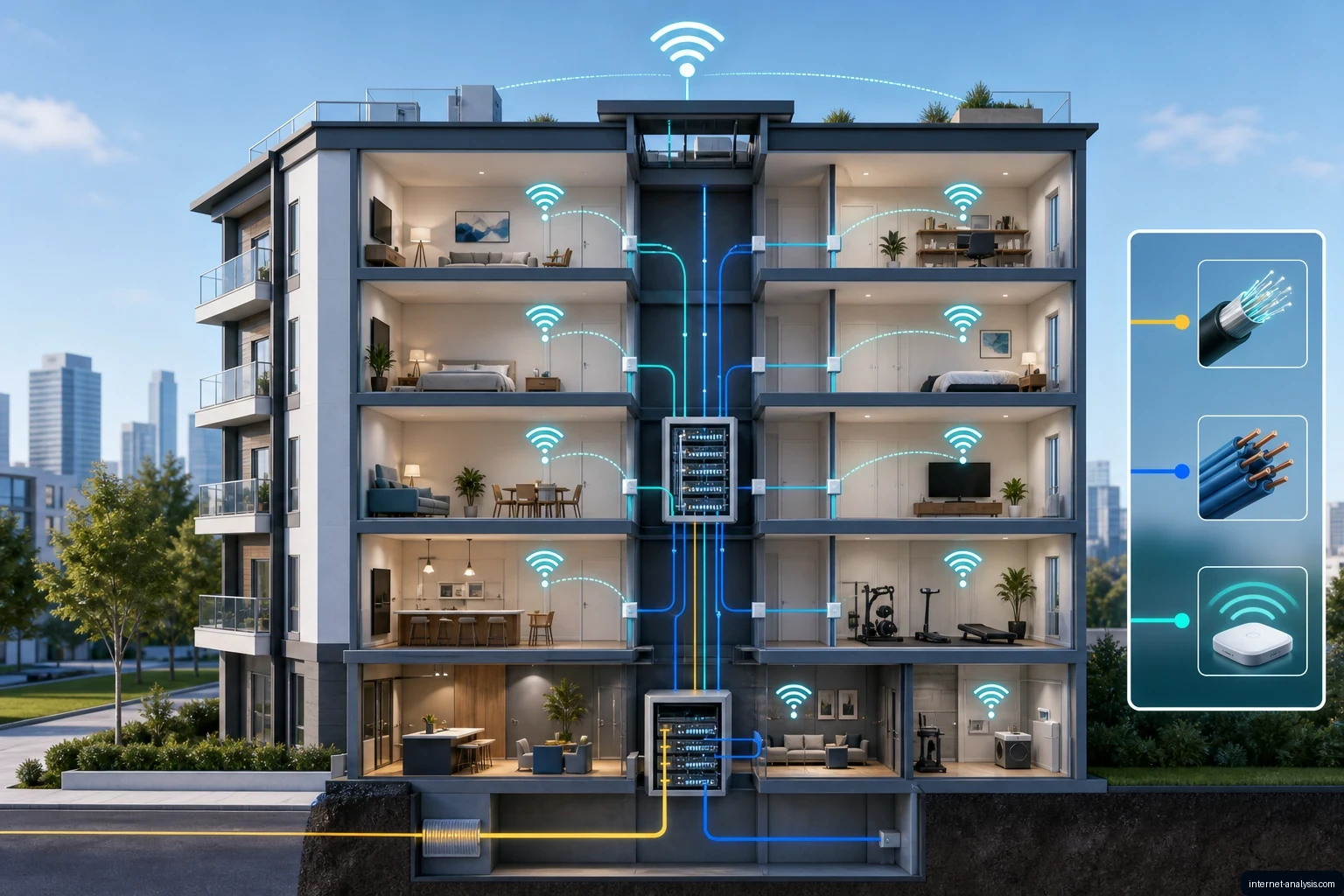
MDU most commonly means multi-dwelling unit: a property containing multiple residences, such as an apartment building, condominium complex, student residence, senior living facility, or military housing community. In telecommunications, the same abbreviation can also describe access equipment that connects a provider’s network to multiple customers in one building.
That distinction matters. An MDU is the property being served, while MDU broadband equipment and managed MDU Wi-Fi are technologies used to deliver connectivity throughout that property.
What is MDU broadband?
MDU broadband is high-speed internet infrastructure designed for a multi-tenant property. Instead of treating every apartment as a completely separate installation, a provider can bring a high-capacity connection into the building and distribute service to individual residences and common areas.
The connection entering the property may use fiber. From a central building location, service can reach individual units over fiber, Ethernet, existing twisted-pair copper, or a combination of wired connections and managed Wi-Fi.
In a fiber-to-the-building configuration, telecom MDU equipment acts as an intermediate node between the provider’s optical distribution network and customer connections. It commonly uses a Passive Optical Network uplink, such as GPON or EPON, and may provide Ethernet, telephone, or VDSL2 connections on the building side.
How an MDU network works
- Internet service reaches the property. A service provider supplies the building with broadband capacity, often through a fiber uplink.
- Building equipment distributes the connection. An MDU access device, optical distribution system, or similar infrastructure divides and directs service toward individual units.
- Each residence receives access. Depending on the design, a unit may have its own Optical Network Terminal, an Ethernet connection, a copper-based VDSL2 connection, or access through managed Wi-Fi.
- Management systems monitor the network. A managed service can remotely configure equipment, apply updates, identify faults, monitor performance, and support residents.
Property-wide Wi-Fi may also support common areas and connected building systems. Examples include smart lighting, thermostats, leak detectors, security equipment, and other Internet of Things devices.
Common MDU deployment models
Fiber to each unit
With fiber-to-the-unit service, each residence receives a dedicated fiber drop and typically has its own terminal. This approach offers strong speed, reliability, security, and upgrade potential. It is especially practical in new buildings that can be wired during construction, although it has higher initial equipment and installation costs.
Fiber to the building with existing wiring
In older properties, fiber may terminate in a basement, communications room, or cabinet. The network then uses existing copper wiring and technologies such as VDSL2 for the final connection to apartments. This hybrid design can reduce renovation work, but performance is more constrained than with fiber running directly to every unit.
Managed property-wide Wi-Fi
A managed Wi-Fi network provides centrally administered access across residences and shared spaces. Residents connect much as they would to a home Wi-Fi network, but the underlying infrastructure serves the wider property. A specialist provider may handle monitoring, security updates, troubleshooting, and resident support.
Advantages of MDU broadband
- Efficient service for dense housing: Shared building infrastructure can connect many customers concentrated in a relatively small area.
- Lower deployment costs in suitable buildings: Fiber-to-the-building designs can reuse short copper runs or existing ducts instead of requiring a new fiber drop to every residence.
- Convenient resident setup: Preinstalled internet can eliminate the need for each new resident to arrange a separate physical installation.
- Centralized maintenance: Managed networks allow providers to configure, update, monitor, and troubleshoot equipment remotely, reducing some on-site service visits.
- Property-wide coverage: A planned system can serve apartments and common areas rather than limiting connectivity to individual in-unit routers.
- Support for smart-building systems: The same managed infrastructure can connect compatible lighting, climate-control, leak-detection, appliance, and security systems.
- Scalability: Modular access equipment and optical distribution designs can add ports or capacity as adoption grows.
- Potential property benefits: Reliable broadband can function as a marketable amenity, help differentiate a property, and create an additional revenue opportunity for an owner that offers managed internet service.
Disadvantages and tradeoffs
- Shared capacity: Some MDU access devices and multi-user terminals distribute bandwidth among several households. Performance therefore depends on the architecture, available capacity, and resident demand.
- Complex retrofits: Older buildings may have narrow ducts, outdated wiring, limited equipment space, or no practical route for new fiber. External raceways or field-spliced cabling can add labor and disruption.
- Central points of failure: Because many users depend on shared building equipment, a power, cooling, cabling, or hardware failure at that node can affect multiple residences.
- Dependence on network management: Managed Wi-Fi requires suitable hardware, monitoring, maintenance, security updates, and responsive technical support. Weak management can result in outages or slowdowns.
- Security requirements: Resident traffic, management systems, and smart-building devices must be protected appropriately. A property-wide network needs secure individual access, threat protection, updates, and separation between resident and building-management functions.
- Higher cost for dedicated fiber: Individual fiber drops and single-dwelling-unit terminals offer better performance and dedicated connections, but they cost more than shared MDU terminals or reuse of existing copper.
- Environmental constraints: Equipment installed in basements, outdoor cabinets, rooftops, or unconditioned corridors may face heat, cold, humidity, power fluctuations, and surge risks. Residential locations also require attention to fan noise.
- Provider selection matters: The property may rely on one specialist for installation, monitoring, maintenance, and resident support. Response time, experience, security practices, and capacity to serve the entire site directly affect the result.
Shared MDU equipment versus a dedicated terminal
| Approach | Main strengths | Main limitations | Typical fit |
|---|---|---|---|
| Shared MDU terminal | Lower cost per residence; can reuse building copper; practical for dense deployments | Bandwidth may be shared; uses more copper; lower upgrade potential than dedicated fiber | Older or cost-sensitive properties |
| Dedicated terminal in each residence | Dedicated fiber connection; higher speed potential; stronger reliability and security | Higher equipment and installation cost | New buildings, renovated properties, and higher-demand users |
| Managed Wi-Fi | Central administration, property-wide access, remote support, and smart-building connectivity | Requires professional management, careful security, and sufficient capacity and coverage | Properties seeking internet as a managed amenity |
What determines whether an MDU network is good or bad?
MDU broadband is not inherently better or worse than individually ordered service. Its quality depends on how the network is designed, installed, secured, and supported.
A strong deployment matches capacity to the building’s size and user density, provides coverage in residences and intended common areas, and leaves room for expansion. It also uses equipment suited to the installation environment and includes remote monitoring, fault detection, surge protection, reliable cooling, and appropriate power systems.
For managed Wi-Fi, residents also need secure individual access and timely technical support. For wired access, planners must decide whether the savings from reusing copper justify its performance limitations or whether dedicated fiber to each unit is the better long-term choice.
Questions to ask before choosing MDU broadband
- Does fiber run only to the building, or all the way to each residence?
- Is bandwidth shared, and how is capacity planned for peak demand?
- Will the service cover every apartment and the required common areas?
- Can the system add ports or move to faster optical uplinks without complete replacement?
- How are resident networks separated from property-management and smart-building systems?
- Who provides monitoring, security updates, maintenance, and resident support?
- What happens during a power or equipment failure?
- Can existing ducts and wiring support the planned design?
- Is installed equipment rated for the temperature, humidity, noise, and surge conditions at its location?
The bottom line
MDU broadband uses shared building infrastructure to deliver internet service efficiently to apartments and other multi-residence properties. Its main advantages are centralized management, convenient access, broad property coverage, support for smart-building systems, and potentially lower deployment costs. Its principal drawbacks are shared-capacity risks, retrofit complexity, security and maintenance requirements, and the wider impact of failures in centralized equipment.
Dedicated fiber to each unit generally provides the strongest performance and upgrade path, while fiber-to-the-building and managed Wi-Fi can offer a more economical way to serve existing properties. The right choice depends on the building, its wiring, resident demand, available budget, and the quality of ongoing network support.
RESIDENT CHECKLIST · UPDATED SEPTEMBER 17, 2026
How to check broadband in an apartment before signing up
MDU broadband is internet service designed for a multi-dwelling unit, such as an apartment building, condominium, student residence or senior-living property. The term describes the property and its delivery model; it does not identify one provider, one access technology or a guaranteed level of performance. Check the connection to your apartment, not just the connection entering the building.
Three separate parts of the connection
- 1. Provider to buildingFiber, cable or another access connection
- 2. Building to apartmentFiber, Ethernet, coaxial cable or copper
- 3. Apartment to deviceEthernet or a wireless connection
This is a simplified path, not a diagram of your property. Broadband Forum describes designs that reuse existing copper or coaxial wiring inside a building to extend fiber service. The word “fiber” alone does not establish the final in-building connection. Broadband Forum: extending fiber through existing wiring.
A fiber drop to each apartment is not necessarily dedicated end-to-end capacity. Passive optical networks can share an upstream fiber through a splitter. Ask about the plan and network design rather than treating a dedicated terminal as proof that bandwidth, reliability or security is guaranteed. Broadband Forum: PON architecture.
| Check | Ask for | Why it matters |
|---|---|---|
| Exact apartment | Written confirmation for your building and unit | A building-level listing does not verify the installation inside your unit. |
| Price and terms | The plan label, equipment charges and any separate building fee | Compare total cost and terms, not just the advertised headline price. |
| Upload and latency | Typical upload/download speeds and latency for the plan | Calls and large file uploads need more than a download-speed claim. |
| Support boundary | Who handles in-unit Wi-Fi, building wiring and provider faults | A clear contact and ticket history make escalation easier. |
| Shared Wi-Fi | How resident access is separated and who maintains it | Do not assume a common Wi-Fi name means your devices are isolated. |
For a US address, use the FCC National Broadband Map to identify provider-reported availability, then confirm service with the provider. The map is not a speed-test result. FCC map instructions. Plan labels distinguish typical speeds and latency; see Google Fiber’s explanation of its wired measurements for an example, not a recommendation of that provider.
If apartment internet is slow, collect a comparison first
- Use one device, pause background transfers and record the test destination and time.
- Run a speed test on Wi-Fi and over Ethernet, if a permitted wired connection is available.
- Repeat at the same location and during the time the problem normally occurs. Keep all results, including unsuccessful tests.
- If Wi-Fi alone is worse, follow the Wi-Fi diagnosis. If both connections degrade, investigate shared equipment, congestion and the test endpoint before assigning blame.
- For calls that break up despite good download speed, check jitter and request failures and packet-loss limitations.
If several apartments become slow at the same time, record comparable wired results before assuming that the shared building network is responsible. Follow the suddenly slow internet diagnostic to separate device, Wi-Fi, router and upstream causes.
This checklist is general technical guidance, not a survey of apartment networks or a guarantee of availability. Building access arrangements and plan terms need individual verification. Compare the wider broadband technology directory, or use the 200 Mbps planning guide to estimate household capacity.

Piotr
Network Performance Analyst at Internet AnalysisPiotr analyzes how download speed, upload speed, latency, jitter, and packet loss affect real-world connectivity. He translates test results into careful, reproducible explanations.
View author profile →How this article was prepared
Uses consistent metric definitions, excludes invalid samples where identifiable, compares medians rather than isolated extremes, and describes device, access-network, and geographic limitations.
Read our methodology →Reviewed by the Internet Analysis Editorial Team
Reviewed by the Internet Analysis Editorial Team · Updated September 17, 2026
Meet the editorial team →Article context, review and related questions
A practical guide to multi-dwelling-unit broadband, including how MDU networks work, fiber and managed Wi-Fi options, and the major benefits, drawbacks, and deployment considerations.
| Measure | Value | Context |
|---|---|---|
| Article type | Telecommunications | Editorial classification |
| Reading time | 7 minutes | Estimated at approximately 220 words per minute |
| Editorial review | Internet Analysis Editorial Team | Updated September 17, 2026 |
| Review date | September 17, 2026 | Latest stored article update |
Methodology
Uses consistent metric definitions, excludes invalid samples where identifiable, compares medians rather than isolated extremes, and describes device, access-network, and geographic limitations.
Full methodology →Data freshness
- Page updated
- Data period
- August 13, 2026
- Responsible editor
- PiotrNetwork Performance Analyst
Primary sources
- Internet Analysis editorial methodologyReview and limitation rules
Limitations
- The article is informational and may simplify technical details for readability.
- Products, standards, prices and service availability can change after the review date.
- The latest review date does not guarantee that every external product or service remains unchanged.
Related questions
What is the main point of “MDU Broadband: Internet for Multi-Dwelling Units”?
A practical guide to multi-dwelling-unit broadband, including how MDU networks work, fiber and managed Wi-Fi options, and the major benefits, drawbacks, and deployment considerations.
How was this article prepared?
Uses consistent metric definitions, excludes invalid samples where identifiable, compares medians rather than isolated extremes, and describes device, access-network, and geographic limitations.
When was this information last reviewed?
The latest stored review or update date is September 17, 2026.